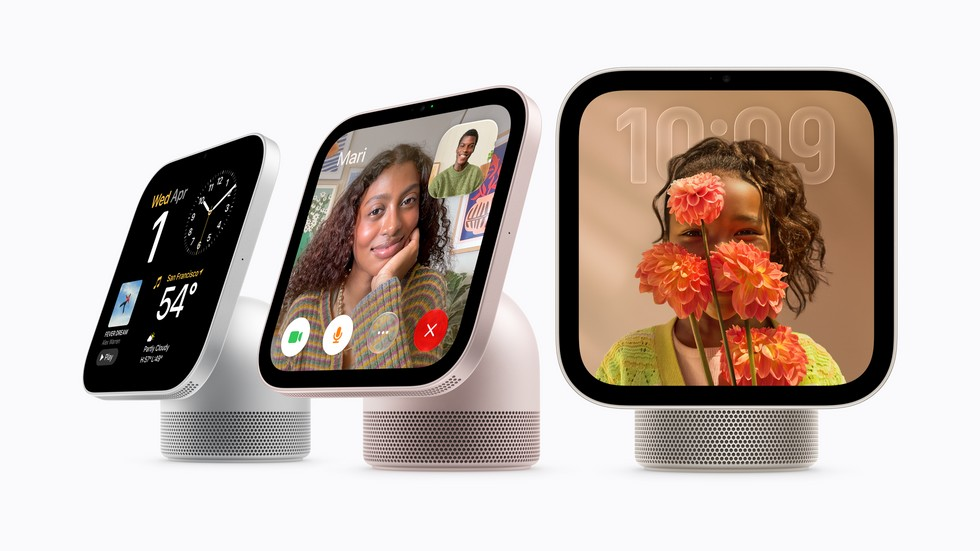

Apple HomeView arrived in stores on November 13, giving Apple users a new screen for music, FaceTime, calendars and smart-home controls. The device costs $299 in the United States for both the tabletop and wall-mounted versions, before any optional wall-mount accessories. Its biggest selling point is the way it combines a shared household display with personal information for different people. The bigger question is whether the features justify adding another device to an Apple-heavy home.
What Apple HomeView does around the house

HomeView is a smart display built around a 7-inch Liquid Retina screen, a speaker base and a camera for video calls. Apple positions it as a central place to check household information, play music, make FaceTime calls and control compatible smart-home accessories through the Home app. It can sit on a table or be installed on a wall, making it more like a shared control panel than a portable tablet.
The display can show personal calendars, reminders, photos and other supported information. Apple says HomeView recognizes up to six people by face and adapts the content shown for each person. The idea is practical: one screen can sit in a kitchen or entryway without showing every family member the same personal dashboard.
The product also has a 12-megapixel Center Stage camera, four beamforming microphones and speakers designed for room-filling audio. Those specifications make it more capable for calls and voice interaction than a basic digital photo frame. It is still a fixed home device, however, not a replacement for an iPad that people can carry from room to room.
Siri AI, personal context and the privacy trade-off

Apple’s new Siri AI is central to the HomeView pitch. The assistant can answer general questions, respond to what is on screen and, when paired with a compatible Apple Intelligence-enabled iPhone or iPad, use personal context from supported apps such as Calendar and Messages. That pairing requirement matters: some of the more personalized functions depend on another Apple device, rather than operating entirely from HomeView on its own.
There are also limits that buyers should understand before paying. Apple says Siri AI is in beta in HomeView software version 27.2, availability varies by language and region, and personal-context requests require a paired Apple Intelligence-enabled iPhone or iPad with the latest software and Siri AI turned on. Some server-based Apple Intelligence features have daily usage limits, and Apple says expanded access to some features may become paid in the future.
Apple says personal content appears only when HomeView recognizes the user and that person’s paired iPhone or iPad is present and recently unlocked. That is an important privacy design, but it also means setup and multiuser features rely on compatible Apple hardware and the household’s settings. Buyers should review the product’s privacy details rather than treating the phrase “private for all” as a substitute for understanding the conditions.
Price, availability and who should consider buying it

The U.S. price is $299 for the tabletop model and $299 for the wall-mounted model. The wall-mounted version needs a compatible mount: Apple’s listed USB-C wall connector starts at $59.95, its wired AC mount starts at $79.95, and a Power over Ethernet option is planned for early 2027 at $129.95. The tabletop model comes in silver, starlight, rose pink and space gray; the wall-mounted model is offered in silver and space gray.
Apple lists availability in the United States, Canada, Australia, India, New Zealand, Singapore and the United Kingdom, with English Siri AI support in those markets and South Africa. Apple says HomeView is not currently sold in the European Union because Siri AI is not available in iOS there. Setup and multiuser support require a compatible iPhone or iPad running the latest software.
The strongest case for HomeView is a household that already uses iPhones, Apple Home accessories, FaceTime and shared calendars. For that buyer, the screen could become a useful home hub. Someone who mainly wants a smart speaker, a basic clock or an inexpensive digital frame may not need to spend $299. HomeView’s appeal depends less on the display alone and more on whether the Apple ecosystem features will be used every day.
Bottom line:

Apple HomeView is a $299 smart display with a clear role in an Apple-connected home. Its camera, personal profiles and Home app controls are useful differentiators, but Siri AI is still marked beta and some personal features depend on a paired iPhone or iPad. Check compatibility and regional availability before buying.
Sources:

Apple Newsroom: HomeView availability and features; Apple HomeView product page; Apple HomeView technical specifications.
Editorial note: Product details, pricing and regional availability checked November 20, 2026. This is an explainer based on Apple’s published specifications, not a hands-on review.




Leave a Reply
You must be logged in to post a comment.